Here's a rule that just about everyone knows, but almost no one follows: whenever you create a new password, use a random mixture of letters and numbers, don't use regular words, and make sure it is a password you have never used before. No one does this because the password would be too difficult to remember.
Here's an easy way to create a good password that you WILL remember. Instead of thinking of a password, think of a sentence. For example:
I got my driver's license when I was 16.
That's easy to remember, right? Then take the first letter of each word of the sentence, and here's your password:
igmdlwiw16
There we have random letters and numbers that don't spell a dictionary word. If you wanted to get tricky, you could use the last letter of each word in the sentence. But don't get so tricky that you can't remember the method that you used!
This week's video is a really freaky robot, created by a team of engineers in Boston:
Monday, April 21, 2008
Sunday, April 20, 2008
I love Florida!
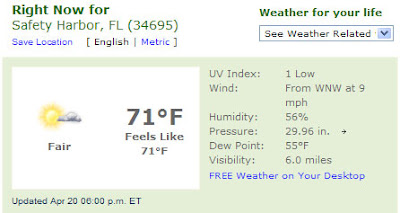
Today was a great example of why I love living on the gulf coast of Florida. First, the weather today was fantastic:
I took one of our dogs up to the Safety Harbor Marina/Pier for a walk. There was a wedding that had just taken place:

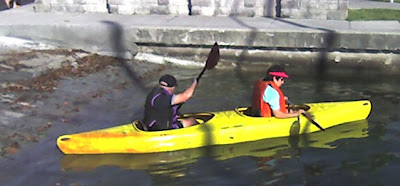
Then over at the boat ramp, there was a couple launching their kayak -
And right after that, a pontoon boat full of people came in to the dock after spending the afternoon out on Tampa Bay:

It was a great day!

I took one of our dogs up to the Safety Harbor Marina/Pier for a walk. There was a wedding that had just taken place:

Then over at the boat ramp, there was a couple launching their kayak -

And right after that, a pontoon boat full of people came in to the dock after spending the afternoon out on Tampa Bay:

It was a great day!


Friday, April 18, 2008
Tip on making a fake ID
Need a fake ID? No problem, there are places all over the internet where you can order one. Here's a tip - choose carefully which photo you will use. An authentic state identification card generally pictures just one person.


Monday, April 14, 2008
Free fonts - thousands and thousands of them!
Everyone loves to spice up a text document (or an email) by using a different font. Most people have a lot more fonts installed on their computer than they will ever use. Can you have too many fonts? Absolutely. Here's why:
1. The fonts that are installed on your computer are all catalogued in a Registry key. The key that holds all of that info does not have unlimited space. If you have too many fonts, you might find one day that you try to install a new one, and the computer won't let you. This is usually when you have several hundred (or maybe close to a thousand) installed fonts.
2. Practically speaking, if you are creating a Word document and want to use some different kind of font, do you really want to scroll through 500 fonts to choose one?
So, the point is, don't just go installing fonts all the time unless there is a chance that you will actually use them.
Now, having said that, I present you with a collection of websites that offer...free fonts! From the sites listed below, you can choose from thousands and thousands of different fonts, and you don't have to pay for any of them. This blog post will be a good reference for you to use in the future when you need a new font - so I recommend that you bookmark it.
And now - the free fonts:
Font River
Fontsy
Fawnt
Mike's Sketch Pad
Filecart
Bittbox
Iconian
Font Garden
Search Free Fonts
Get Free Fonts
The Font Shack
Keith Devens
Font Foundry
Font Reactor
Simply the Best Fonts
Fontennium
More free quality fonts
Acid fonts
Daily Free Fonts
Fonts 500
Urban Fonts
High Fonts
Web page fonts
Da font
Font Freak
Larabie Fonts
Themed Fonts
Divide by Zero
1001 Fonts
Better Fonts
Blambot Comic Fonts
Modern Life
Abstract Fonts
40 Excellent Free Fonts
Free Font Downloads
This week's video isn't funny, but it is entertaining and has a good message.
Saturday, April 12, 2008
Personal service is best
If your computer has a problem, what do you do? Maybe you're lucky enough to have a family member or close friend that is good with computers and has time to fix it. Or perhaps someone like that can walk you through a repair over the phone.
Because of a big advertising campaign, the first choice for some people is the repair guys at the local "box store". I am talking about the Geek Squad, which is part of Best Buy. This is not always the worst choice, but the problem is that these guys just work for an hourly wage. They don't usually get to know the customer very well, and they don't necessarily have the customer's best interests at heart. Here's a good example of this.
I have repaired hundreds of computers with all kinds of different problems. Before I do anything, I want to get a good idea of exactly what the problem is. I also want to make sure that the customer's data will never be at risk, so I determine that all important data is already backed up (or I back it up). Then, I completely analyze the computer and determine what the problem is and how long I believe it will take to fix it. If, during the course of the repair, it gets more complicated and will take longer than I estimated, I contact the customer to explain the situation and get permission to proceed.
My point is that when you deal with me, you get personal service. You are not just one of thousands of machines that I am working on. I understand your dependence on your computer and my job is to make sure it is working correctly. I don't want my customers to be satisfied; I want them to be raving fans!
Friday, April 11, 2008
Don't do this to your computer

I tell all of my clients to not have food or drinks near their computer. Does my own household listen to this advice? Not exactly.
Monday, April 7, 2008
No more comments
Unfortunately, I have had to disable the "Comments" feature on my blog. Recently there have been comments added that were not acceptable.
Today, a scumbag spammer scammer posted a link to a scam antivirus website. The site appears to be "scanning" your computer for viruses. Then it shows that it has "found" several viruses on your hard drive. Then of course, there is the offer to get rid of those viruses - for a fee, of course. This is a complete scam, and these vermin travel the internet posting their links on blogs such as mine. Well, not any more.
I do enjoy hearing from you, so if you have any comments about a post here, just send me an email. Sorry for the inconvenience.
Get hassled!
"I decided to quit procrastinating. Starting tomorrow."
You know there are some things you have to do, you just avoid getting started. Or you forget about them and then remember at a time when you can't get started. Of course, once the job is started, it's usually not that big a deal and I wonder why I kept putting it off for so long.
Sometimes all we need is a little nagging. A reminder every so often that "hey, you need to do this thing - don't forget!". Now there's an internet service that does just that. It hassles you!
You can sign up free at www.hassleme.co.uk and enter those things you want to get "hassled" about, and approximately how often. You will receive an email reminder to get busy and do that task. Some examples:
- go to the gym roughly every 4 days
- write an entry in my diary roughly every 3 days
- call your mother roughly every 7 days
One of the future planned features is that you can get hassled via text message to your cell phone - handy for people who don't check their email very often (you know who you are!).
In the past I have used video clips of people singing the Star Spangled Banner - usually because they mess up. This week's video is the same song, but performed very well by the Cactus Cuties - a group of very talented (and very young!) girls.
Sunday, April 6, 2008
Not all teachers are underpaid
Homeschooling is not right for everyone, but this letter from a school teacher to a parent sure makes a good case for it.

Saturday, April 5, 2008

Monday, March 31, 2008
NOW who do we vote for?
For those of you wondering which candidate should get your vote this election season, the picture just got a whole lot more confusing.
The rapper known as 50 Cent (if you say it out loud, be sure to pronounce it correctly: "fiddy cent") has decided to switch his endorsement again.
A few weeks ago, he was a Hillary backer: "There's nothing bad about Obama in my eyes...but I just think Hillary would be my choice."
Then he heard Obama's recent speech on racial issues: "Yo, Obama! I'm Obama to the end now, baby!"
Yet his most recent comments were, "To be honest, I haven't been following that anymore. I lost my interest."
So where does that leave the rest of us, the ones who were looking for some guidance in these complex political issues? Are we supposed to just research the issue ourselves now, without any help at all from the rap community? I just don't know what to do.
Fix a pesky Word problem
I like Microsoft Word, but it sure does some annoying things sometimes. This week's tip is about one of those bothersome Word functions, and how to fix it.
I like to use tables. If you have several different information items and you want to display them in a Word document, using a table is often the best way to do it. However - if you make your table fill up the whole page, you might find that you now have a 2-page document. Page 1 is your table and your data inside that table, and page 2 is...nothing. Yes, the cursor blinks there, but you cannot backspace and no matter what you try to do, that second page just sits there laughing at you because you can't get rid of it.Here's what's going on, and how to be done with it.
After the table, Word inserts a paragraph mark. You just can't see it. If you tell Word to show the paragraph mark(s) then you will see it. This is done by using the "Show/Hide" command. In Word 2007, get to the "Home" tab, and then in the Paragraph section, click on the paragraph symbol. Now you will see all of the paragraph symbols in the document - including that pesky one on page 2.
First, highlight that page 2 paragraph mark by double-clicking on it. Now, go up to the font size selection at the top of the screen and click the drop-down menu as if you were going to change the font. Instead of clicking on one of the font sizes displayed, hit the number 1 on your keyboard, and then the Enter key (this actually changes the font size to 1). Now you will see that the paragraph mark is extremely small, but it has moved back to page 1! Page 2 is gone.
You can now go back to the paragraph section and select the paragraph symbol so that you don't see all of those symbols on the page any more.
This week's video is about a wonderful woman and what she does for the families of fallen soldiers. I cannot embed this video in my blog, but you can see it at the link below.
Sunday, March 30, 2008

Monday, March 24, 2008
A good cause

My son David will be graduating from college in May (don't ask me how those years flew by so fast - I have no idea). David plans to teach English in Ecuador, but right after graduation will be taking a short trip to China. He is in the process of raising the needed funds for that trip. Here are some details, as written by David:
As many of you know, I will be finishing my undergraduate education this May. Many of you also know that my plan and dream is to return to Ecuador to teach English. The prospect of graduating is especially exciting to me since I will be making the formal transition from student to teacher.
I would be perfectly content to move to Ecuador after graduation to join friends and begin my career. After much prayer and advice from adults who were once in my position, however, I have decided to postpone my plans, for a time, in order to travel and gain new experiences. Although I do not yet know the full implications of this decision, I have already begun planning for this new and exciting time. Several weeks ago, I was asked if I would be interested in joining a team from my church who would be traveling to China this summer to teach English. Needless to say, my decision was not a difficult one to make!
So, this May 16th, I will fly from Tampa to Yinchuan, China, a city in north, central China. Led by my church’s Community Life Pastor, Jack Piquette, who recently moved back to Florida after having lived in Yinchuan with his family for two years, our team will work in one of the universities in Yinchuan, teaching English, building relationships, and serving the faculty in any way we can.
My hope is that we will not only be able to help those in China with whom we come in contact, but that this experience will open doors and yield more opportunities for me to serve in the upcoming year before I return to Ecuador.
Right now, everyone on the team is preparing for the trip in several ways. One way we are preparing is by asking for the support of family and friends. Not surprisingly, one of the areas we need support is finances. The total cost for each member to go on this trip is $2,000. So, please keep us in your prayers, and, if possible, please consider joining those who have already given to make this trip possible. If you are able to assist financially, please make checks out to Clearwater Community Church and put “David Johnson – China” on the memo line – (by early April, if possible).
Thank you all SO much for your help! Finally, when I return, I will be posting pictures from the trip. So, if you’re interested in seeing those, check back here in late May for the “debriefing”. Thanks again! David
If you are able to help David with this trip, he would greatly appreciate it! Please mail your check to:
Clearwater Community Church
2897 Belcher Road
Dunedin, FL 34698
Create an email signature
If you use email (of course you do because everyone does) you should have an email signature file (better known as a sig file). Why type your name at the end of each email, when it is always the same anyway? Let the computer do it for you. If you get an email from me, here is what is at the end of the message:

If you have a business, you can put your business name and address or whatever other contact information you want on there. It's your sig file, so it's up to you what you want to use.
There's a great website if you want to create a signature in your choice of font. It is mylivesignature.com and that is where I created mine.
Once you have created it, how do you get it to show up in your emails? That depends on what you use for email.
Outlook Express: click Tools - Options - Signatures
Outlook 2007 (and earlier versions of Outlook also, I believe): Tools - Options - Mail Format - Signatures
Web-based email:
Gmail: Settings - General tab - Signature
Yahoo: Options - Signature
Hotmail: I don't use Hotmail because it is a truly awful email service, so I am not specifically familiar with the sigfile procedure - but you can get the instructions here.
This week's video shows what firemen do when there are no fires and they get bored. They make cars fly.
Tuesday, March 18, 2008
Not every IT person is an expert
From Computer Stupidities:
A friend of mine told me that when he was in junior high school (mid-to-late nineties), they got a computer in the classroom free for the students to use during breaks. The first thing many of them would do to was to change the dull Windows 95 desktop. The school's IT Manager for some reason thought of this as vandalism, so he frequently fixed it in the only way he knew how -- by reinstalling Windows.
I was almost on the floor laughing when my friend told me about how the IT Manager had come into their classroom one day and told the students, "Will you STOP changing the desktop background? I've had to reinstall Windows every day for the last two weeks now!"
Monday, March 17, 2008
Gmail tracking tricks
As you know by now, I use and highly recommend Gmail - Google's free email service. I could probably do several month's worth of weekly tips on things you can do with your Gmail account. But this week, I want to tell you about two of the most valuable tricks available.
Trick #1
Let's say my email address is pctutor@gmail.com (which it is!). Gmail allows you to use dots in between the characters of the user name portion (that's the part to the left of the @ sign). So - any email that gets sent to:
pc.tutor@gmail.com
p.c.tutor@gmail.com
pct.u.t.o.r@gmail.com
or even
p.c.t.u.t.o.r@gmail.com
would still end up at my regular email account, pctutor@gmail.com. Even though you only signed up for one Gmail account, you effectively have several accounts by using this feature. You can use one configuration for work, one for home, one for school, etc. and you still only have to check that one email account to receive all of them.
Trick #2
This one is really cool. You can use the "+" sign after your user name and enter anything you want after that, and the email will still get to your original account. So, next time you are at a website that requires you to put in an email address to register, you don't have to worry about them spamming you because you can enter your email address like this:
pctutor+flakywebsite@gmail.com
If you wanted to get really fancy, you can use a different word or number (or combination) every time you give out your email address, then track which site or company sold your email to some spammer. Then, just tell Gmail to automatically delete any emails that contain that code.
This week's video will make you think about your life, and put your problems in perspective. You need to see this.
Monday, March 10, 2008
Fun in New York City
This week is a little diversion from the typical Monday "here's how to fix your computer" tip. Sometimes you just need a break.
One of my favorite shows was Candid Camera. To me, some of the best humor is found in seeing how human beings react in various set-up situations. Of course, there have been many shows that have copied Candid Camera (Punk'd, Scare Tactics, etc.) and some of them have been pretty entertaining at times.
There's a group in New York that operates on the same premise, except they are not on television. They are on the internet. The group is called Improv Everywhere. Basically, this organization plans and executes scenes in public places that catch the attention of passers-by, to get their reaction. These scenes can use just a few people (those that are involved are called "agents"), or there may be hundreds involved. Some of them are quite complex and involve lots of coordination.
Here are a few examples of what they have done:
- 60 cell phones ring at the same time (in the bag-check area of a large bookstore)
- The McDonald's bathroom attendant
- Of the thousands of people in Grand Central Station, over 200 people freeze in place for 5 minutes
- The Hug Patrol
- Surprise birthday party - while on the subway
There are lots more and they have lots of pictures and video. It's good, clean, clever fun - which is a nice thing to find on the internet!
This week's video is a combination of comedy and gymnastics:
Monday, March 3, 2008
The trick to viewing online videos smoothly
Even on a high-speed connection, when you view an online video the playback can be choppy sometimes. Depending on the format, a video can use a lot of "bandwidth" - that basically means that you are transferring a large amount of data from the video's server to your computer. Since your internet connection speed can vary, sometimes a video will play smoothly and other times it might have that stop/start problem. And if you are still on dialup - don't even bother trying.
Here's how you can get your videos to play without having to stop and let the data "catch up" to it. Just click the Pause button and wait for the download to get well ahead of the scene marker.
You can try it with this week's video below. Instead of just starting to play it as normal, click the Play button and then right away click the Pause button (that's the one that replaces the Play button when the video is actually playing). Watch the gray bar fill up across the bottom - that's the data loading. You can wait until it gets about halfway, or you can wait until it is completely across.
Now click Play again, and you can watch the video without interruption.
This week's video is a great display of redneck art - which is actually rather impressive!
Monday, February 25, 2008
TinyUrl links - the real destination
Most people that have used the internet for a while know about the TinyUrl service. For those that are not familiar with it, here's a quick primer.
If you find a website that you want to tell your friends about, all you have to do is copy and paste the URL (the website address) into an email. Simple, right? Sometimes yes, sometimes no. What if the address looks something like this:
But what about security? I mean, you don't really want to be blindly clicking on links and not knowing exactly where you are being taken, right? That is the subject of today's tip.
The TinyURL website has a special feature that you should enable: the Preview Feature. You will see a link on the left side of the TinyURL website called Preview Feature. Just click on that, and then click on "Click here to enable previews". That is all you have to do - the site puts a cookie on your computer so it knows your preference.
Now, whenever you click on a TinyURL link, it will first take you to a page that tells you the ACTUAL website address to which you are being taken. Then, you can continue on to the site, knowing that you will be safe.
This week's video - forget being smarter than a 5th Grader; are smarter than a chimpanzee?
If you find a website that you want to tell your friends about, all you have to do is copy and paste the URL (the website address) into an email. Simple, right? Sometimes yes, sometimes no. What if the address looks something like this:
http://www.mapquest.com/maps/map.adp?ovi=1&mqmaYou really don't want to paste something that long into an email. This is where the TinyURL service comes in. Just go to www.tinyurl.com and paste that ridiculously long address into the form on the front page, and they will automatically create a nice SHORT address that you can use instead of the long one. You will get something like this:
p.x=300&mqmap.y=75&mapdata=%252bKZmeiIh6N%252bI
gpXRP3bylMaN0O4z8OOUkZWYe7NRH6ldDN96YFTIUmSH3Q6
OzE5XVqcuc5zb%252fY5wy1MZwTnT2pu%252bNMjOjsHjvN
lygTRMzqazPStrN%252f1YzA0oWEWLwkHdhVHeG9sG6cMrf
XNJKHY6fML4o6Nb0SeQm75ET9jAjKelrmqBCNta%252bsKC
9n8jslz%252fo188N4g3BvAJYuzx8J8r%252f1fPFWkPYg%
252bT9Su5KoQ9YpNSj%252bmo0h0aEK%252bofj3f6vCP
http://tinyurl.com/6So now, whenever you see a link like that, you know it is really just a shortened link that goes to some other website.
But what about security? I mean, you don't really want to be blindly clicking on links and not knowing exactly where you are being taken, right? That is the subject of today's tip.
The TinyURL website has a special feature that you should enable: the Preview Feature. You will see a link on the left side of the TinyURL website called Preview Feature. Just click on that, and then click on "Click here to enable previews". That is all you have to do - the site puts a cookie on your computer so it knows your preference.
Now, whenever you click on a TinyURL link, it will first take you to a page that tells you the ACTUAL website address to which you are being taken. Then, you can continue on to the site, knowing that you will be safe.
This week's video - forget being smarter than a 5th Grader; are smarter than a chimpanzee?
